📓 3.4.0.7 Introduction to NoSQL
Because our applications are small, we won't be able to see many of the benefits of NoSQL firsthand. Understanding when and why to use it is still worth knowing.
In this lesson, we'll cover some of the ways NoSQL is different from SQL, as well as some of the advantages NoSQL offers over SQL. As is the case with most things in programming, there is no one perfect tool for every job.
Differences Between SQL and NoSQL Databases
We won't cover all of the differences between SQL and NoSQL databases. Instead, we'll focus on a few of the most significant differences:
| SQL | NoSQL |
|---|---|
| Relational | Non-relational |
| Uses a schema | No schema |
| Uses SQL (structured query language) | Doesn't use a declarative query language |
| Great for complex queries | Not built for complex queries |
| ACID approach | BASE approach |
| Not easily distributed | Very easy to distribute |
SQL is a structured query language for relational databases. We use a schema to map exactly how our database tables should look, which means that each record in the database has a fixed number of columns. Because the database is relational, we can create complex queries based on the relationships between different records in the database. For example, if we wanted to find all of an author's books, we'd do a query where we find all of the books in the books table with an author_id property that matches the author's id. SQL databases tend to have a single node and follow the principles of ACID closely.
On the other hand, NoSQL databases are non-relational. They have no schema and don't use a declarative query language. This is why they are essentially called "no SQL": they really are the opposite in many ways. Not having a schema frees up a NoSQL database to have flexibility in storing data.
Here's an example: let's say you have an address book application that tracks the contact details for your friends. However, other than phone number and address, we also want to record other important details to remember. Well, in a NoSQL database, we can structure the data differently for each friend in our address book. Here's what our sample data could look like:
friends {
  AJ {
    phone: "808-334-1029",
    address: "443 Seacrest Dr., Honolulu, HI",
    dogs: ["Ardie", "Koa"]
  },
  Maxx {
    phone: "223-443-2123",
    address: "45557 Winapoo St., New York, NY",
    partner: "Dorian",
    kids: ["Teanna", "Grace", "Ava"]
  },
  Mom {
    phone: "503-554-3232",
    address: "12449 Sycamore Ct., Portland, OR"
  }
}
As we can see, your friend AJ has a dogs field, while your friend Maxx has fields for their partner and kids instead. Also, your mom only has a phone and address listed. Well, in a NoSQL database, we have the flexibility to set up data like this, without requiring every record to have the same fields. If we were to do this with a SQL database, every friend would have every field possible, and we'd need to specify that certain fields (dogs, partner, and kids) allow null values.
As we can see, there are some great benefits to the flexibility that NoSQL offers:
- We don't need to model our data ahead of time or know exactly what it looks like (such as with a schema).
- We can store many different types of data with many different types of fields.
One big downside of NoSQL databases is that they aren't great for complex queries. Looking back at the example of an author and their books, let's say we often wanted to find target demographics for books. For instance, we might want to find all the readers that are women between the ages of 40 and 49 for all of a specific author's books. That's a pretty complex query, and not one that NoSQL is built to deal with. SQL, on the other hand, is built to deal with these relationships.
One thing to watch out for: you may find yourself wanting to establish relationships between records in different collections, the way you would with SQL tables. We'll cover some basic ways to do this in Structuring Data in Firestore, but relationships simply aren't a strength of NoSQL.
Also, because NoSQL doesn't have its own structured query language, we'll find ourselves using the syntax of the NoSQL provider that we're using. In our case, since we're using Firestore, we'll be using Firestore functions to make queries.
Using Firestore syntax has upsides and downsides. On the one hand, Firestore exposes a lot of methods that give us additional functionality, making our lives easier as developers. On the other, learning this functionality (and incorporating it into our applications) is very specific to Firebase. We can't apply it to other database services, like MongoDB or DynamoDB. That is why we won't delve too deeply into the particulars of Firestore. While it is helpful to learn the basics, the knowledge we'll gain is fairly narrow in scope. Fortunately, the documentation for Firestore is extensive if you want to do a deeper exploration on your own.
The last thing to note is how each type of database handles scaling. Traditional SQL databases are designed around a single authoritative server. They scale primarily by upgrading hardware, adding more RAM or CPU to handle more traffic. Horizontal distribution (spreading the database across multiple servers) is possible, but requires additional complexity.
NoSQL databases, by contrast, were designed from the start to spread data across many servers. This makes horizontal scaling more straightforward: to handle more traffic, you add more servers rather than upgrading existing ones. However, as we'll see in the next lesson on the CAP theorem, distribution always involves tradeoffs, particularly around data consistency.
Next, let's look at how NoSQL databases store data.
How NoSQL is Stored
SQL databases store their data in tables. Each table has a primary key and one or more fields for which we specify a data type. At this point, we should be very familiar with that information. But how is NoSQL data stored?
NoSQL data is commonly stored in these formats:
- key-value pairs
- graphs
- wide columns
- documents
We won't get into all of the examples listed above now. There are a lot of resources online if you want to learn more about any of the above database formats. To see more examples and NoSQL database providers, visit the Wikipedia page on NoSQL.
We will, however, look more closely at how both of Firebase's NoSQL databases are stored. This will help us get a sense of what NoSQL databases look like!
Starting with the Firebase Realtime Database, this database is structured as a JSON tree, which is a type of a "key-value pair" database structure. To visualize this, we can make a few small tweaks to our friends data from earlier in this lesson.
Here's how the data inside of a Firebase Realtime Database is structured:
{
  "friends": {
    "AJ": {
      "phone": "808-334-1029",
      "address": "443 Seacrest Dr., Honolulu, HI",
      "dogs": {
        "0": "Ardie",
        "1": "Koa"
      }
    },
    "Maxx": {
      "phone": "223-443-2123",
      "address": "45557 Winapoo St., New York, NY",
      "partner": "Dorian",
      "kids": {
        "0": "Teanna",
        "1": "Grace",
        "2": "Ava"
      }
    },
    "Mom": {
      "phone": "503-554-3232",
      "address": "12449 Sycamore Ct., Portland, OR"
    }
  }
}
The entire database is represented by the outermost curly brackets. Within our example database, we have a "friends" key that is set to an object, and each individual friend is stored inside as a key-value pair. Notably, the Firebase Realtime Database does not use arrays.
You may already be wondering how to query the data inside of this database. Well, if you want to learn more about the Firebase Realtime Database, visit the Firebase docs. Again, we're focused on just getting a sense of how NoSQL databases are structured, and visualizing what this looks like.
Next, let's look at how a Firestore Database is structured. Firestore structures its data into documents, which are organized into collections. Each document has fields that map to values, similar to a key-value pair. Documents support many different data types. Also, documents can optionally have one or more subcollections, each with their own documents inside.
Let's restructure our friend data into Firestore documents and collections. In this case friends would be our collection, and each friend would correspond to a document. Here's what our data would look like:
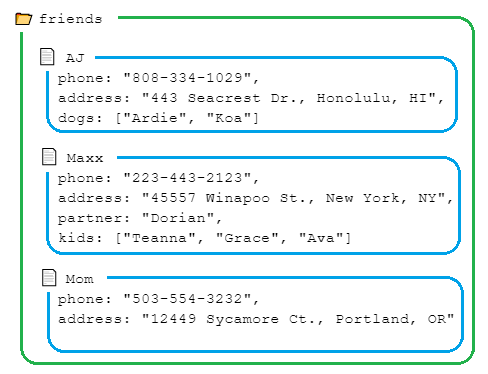
In the example above, the folder icon is meant to represent a Firestore collection, and the document icon, a Firestore document. Also, take note that there are no subcollections in this example. With the document-driven Firestore database, we can group data together (related documents are in the same collection), but also keep data distinctly separated (each document is separate and unique, and so is each collection).
Turning Firestore data into JavaScript is a natural process: each document's fields map directly to JavaScript object properties, and Firestore collections can be looped through, transforming them into an array or object. We'll see all of this in action in upcoming lessons.
At this point, we should have a sense of the basic differences between NoSQL and SQL databases. In the next lesson, we're going to review the CAP theorem, which seeks to describe the tradeoffs of using distributed databases.