📓 3.4.0.4 The Rules of Hooks, Custom Hooks, and Why Hooks Are Awesome
In this lesson, we'll recap the best practices and rules of hooks. We'll also review why hooks are so beloved in the React developer community by explaining how hooks improve how we can reuse stateful logic in our apps. In the process, we'll write our own custom hook.
How to Use Hooks in a React Application
With the power of being able to use state and lifecycle features in function components, you might wonder if how we structure our React applications should also change. The short answer is no. Hooks are a more direct way to use React features we already know, like state, context, and refs. They don't fundamentally change how React works, and our knowledge of components, props, and top-down data flow is just as relevant as it was before.
One common question is: should we add state in whichever component we feel needs it now? Not necessarily. As a rule, we should always think carefully about where we add state. In fact, React has a guide for this decision making and design process: Thinking in React. This guide covers creating a React application from the ground up, and several of its steps cover state. We highly recommend that you revisit this document whenever you have questions about how to structure your React application.
As a quick review, here's the process the React docs recommend for deciding where state should live. For each piece of state in the application:
- Identify every component that renders something based on that state.
- Find their closest common parent, a single component above all of the components that need the state.
- Put the state in that common parent, or in a component higher up the tree.
- If there's no component where it makes sense to own the state, create a new component solely for holding the state and add it to the tree above the common parent.
Rules of Hooks
There are two rules for using hooks:
- Only call hooks at the top level of a function component. Don't call hooks inside loops, conditions, or nested functions.
- Only call hooks from React function components. Don't call hooks from regular functions (unless you are creating a custom hook, more on this soon!) or from class components.
Projects scaffolded with Vite's React and TypeScript template come with an ESLint plugin for hooks already configured in eslint.config.js. It will warn you about misusing hooks when you run npm run lint, and your editor will surface the same warnings inline as you type. Pay attention to those warnings so that you can catch misused hooks early.
For more detailed information, visit the React docs: Rules of Hooks.
Best Practices for Hooks
Other than the rules of hooks that we must follow, there are two best practices that we should also follow:
- Use multiple hooks to handle different concerns.
- For example, it's better to use multiple
useStatehooks to handle different state variables, instead of grouping them into oneuseStatehook. - We should also use multiple
useEffecthooks to manage different effects. Doing so practices separation of concerns and is a huge benefit with theuseEffecthook.
- Convention dictates that the name of custom hooks should start with "use", like
useStateoruseTimer. Later in this lesson, we'll create a custom hook calleduseTimer!
- Take note that the ESLint plugin for React hooks relies on this naming convention to identify hooks and any issues with them.
Why Hooks Are Awesome
Hooks solve two important problems in React development:
- Reusing stateful logic. If two components need the same stateful behavior, like a timer or a live database connection, hooks let us extract that logic into a custom hook and share it across components without duplicating code.
- Organizing code by concern. Hooks let us group related logic together. For example, all the code for setting up and tearing down a database subscription can live in one
useEffectcall, rather than being scattered across a component.
To see how this works in practice, let's create our own custom hook. Afterwards, we'll briefly discuss the alternatives.
Turning Timer into a Custom Hook
For this example, we'll continue with our counter-app application and extract the stateful timer logic in our Timer component into a custom hook called useTimer. To do this, we'll make updates to Timer.tsx, and we'll also create a brand new useTimer.ts file for our custom hook.
First, go ahead and create a new folder within the src folder called hooks and a file within it called useTimer.ts. Note the extension: a custom hook holds stateful logic but no JSX, so it's a plain .ts file rather than .tsx. React isn't very opinionated about how we organize our folders and files, so we don't have to have a hooks folder with our custom hooks inside. Generally speaking, whatever naming we choose should be intuitive and our folders shouldn't nest too deeply.
Here's the starter code that we'll add to useTimer.ts:
import { useState, useEffect } from 'react';

function useTimer() {
  // stateful logic for our timer will go here!
}

export default useTimer;
As we can see, hooks are just functions. We've imported the useState and useEffect hooks at the top of the file, because we'll use them in our timer logic.
So what stateful logic should we be extracting from Timer.tsx? Any code that sets up and manages our timer. We should not extract out code that handles setting the UI, because that's the job of the React component.
Here's the extracted code from Timer.tsx, added to useTimer.ts:
import { useState, useEffect } from 'react';

function useTimer() {
  const [isActive, setIsActive] = useState(false);
  const [timer, setTimer] = useState(0);

  useEffect(() => {
    let interval: number | undefined;

    if (isActive) {
      interval = setInterval(() => {
        setTimer(timerState => timerState + 1);
      }, 1000);
    }

    return () => clearInterval(interval);
  }, [isActive]);
}

export default useTimer;
Our custom hooks can make use of any built-in React hooks, but as noted earlier, they shouldn't contain any UI logic.
And here's what Timer.tsx should now look like:
import useTimer from './hooks/useTimer';

function Timer() {
  return (
    <>
      {isActive ? <h1>{timer}</h1> : <h1>Timer Stopped</h1>}
      <button onClick={() => setIsActive(!isActive)}>Start/Stop</button>
    </>
  );
}

export default Timer;
At this point, we'll get a series of errors in our editor because Timer.tsx is rendering variables that don't exist! Specifically: isActive, timer, and setIsActive. TypeScript reports each of them as Cannot find name 'isActive', and so on.
And while we've imported the useTimer hook at the top of Timer.tsx, we're not quite ready to use it because our useTimer hook doesn't return anything just yet.
So what should we return from our custom hook? Quite simply, any of the logic that we'll need in the Timer component. We can figure out what this is by looking at the variables used in the Timer component. As noted earlier, these variables are isActive, timer, and setIsActive. So, let's update our useTimer hook to return these variables.
import { useState, useEffect } from 'react';

function useTimer() {
  const [isActive, setIsActive] = useState(false);
  const [timer, setTimer] = useState(0);

  useEffect(() => {
    let interval: number | undefined;

    if (isActive) {
      interval = setInterval(() => {
        setTimer(timerState => timerState + 1);
      }, 1000);
    }

    return () => clearInterval(interval);
  }, [isActive]);

  return { isActive, timer, setIsActive };
}

export default useTimer;
Just like with the useState hook, we're sharing our stateful values and a way to update them, but here we return an object instead of an array. Each property keeps its own type automatically. No extra type annotation is needed, and there's no risk of a caller mixing up the order of the values.
Now, let's update our Timer.tsx component to use the useTimer hook:
import useTimer from './hooks/useTimer';

function Timer() {
  const { isActive, timer, setIsActive } = useTimer();

  return (
    <>
      {isActive ? <h1>{timer}</h1> : <h1>Timer Stopped</h1>}
      <button onClick={() => setIsActive(!isActive)}>Start/Stop</button>
    </>
  );
}

export default Timer;
We destructure the three values from the object that useTimer returns. Note that our component doesn't declare a single type annotation: TypeScript already knows isActive is a boolean, timer is a number, and setIsActive takes a boolean, because each type travels along with its property name. Hover over each variable in your editor to confirm it.
Renaming destructured values, and why useTimer returns an object instead of a tuple:
To rename a value destructured from an object, we can't just write a new name like we could with array destructuring - we use the : syntax instead: const { isActive: isOn, timer: stopwatch } = useTimer();. The type still comes along for the ride, since it's attached to the original property name, not the new local one.
You might notice useState returns a tuple instead, an array like [value, setValue]. That convention reads naturally because there are always exactly two values, always paired. Past two return values, a tuple starts to work against us: positions are easy to mix up, there's no clean way to skip a value we don't need, and inserting a new value shifts every position after it. That's why useTimer returns an object instead. (If you're curious how you'd force an array to behave like a tuple here, it takes return [...] as const;, the same as const from the type assertions lesson - without it, TypeScript would merge all three values into one imprecise type.)
And with that, we've successfully created a custom hook called useTimer! We can now import this hook into any component where we want to use a timer. If we had three separate components, we could use the useTimer hook to create three separate timers, all with separate state. This is exactly what it means to reuse stateful logic, and a single custom hook is all it took.
To learn more about building custom hooks, visit the React docs on Reusing Logic with Custom Hooks.
Before Hooks
For your awareness: here's what developers used before hooks existed for sharing stateful logic. You may encounter these patterns in older React codebases.
Prior to hooks, developers would use a combination of mixins, higher-order components, context, and render props. At this point, mixins are considered harmful, as detailed in the React blog post Mixins Considered Harmful. Higher-order components, context, and render props are all still in use in React, and they are each different tools that enable sharing code between two or more components. The issue with these tools is that they lead to "wrapper hell", where there's an excess of "wrapper" components that handle transferring data, but don't render anything to the UI.
Courtesy of the React docs, we can get a sense of what wrapper hell is by inspecting the component tree with our React DevTools:
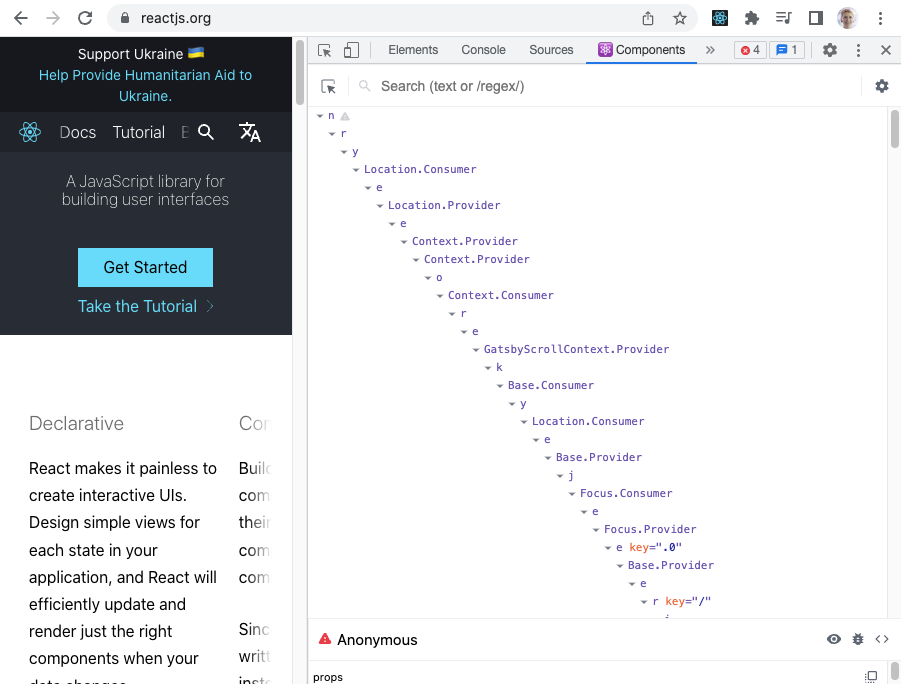
All of the components pictured are wrapper components that do not actually render anything in the page, but instead transfer data. In a typical React application from that era, you would likely find layers of providers, consumers, higher-order components, render props, and other abstractions surrounding the components that actually draw the UI.
The problem with "wrapper hell" is that it is hard to track the flow of data, which makes maintaining and debugging an application that much harder.
With hooks, we can extract data that we want to reuse into a function and import it directly into the components where we need to use that data. What's more, since hooks are just functions, we aren't adding a component to our app's hierarchy of components when we share data via hooks.
And with that, we've covered the very basics of why hooks are so awesome and beloved by the React community. You'll likely still have questions, like what is "render props"? For now, we'll leave that advanced topic to further exploration, so we can focus on hooks.
Next up, we'll return to our Help Queue application and plan how to connect it to Firebase.
There's Much More to Explore!
As always, there's much more to explore about hooks. To see a list of all built-in React hooks, check out this documentation:
To learn more about hooks in general, check out this documentation:
To review React main concepts, read this guide:
We suggest that you read about context, render props, and higher-order components later. Context in particular will come back in a later section, when we use it to share data across a component tree without passing props through every level.