✏️ 1.1.4.12 Practice: Recreate a Site with Bootstrap
Goal: Practice everything we've learned so far by re-creating a real website using block and inline HTML elements, custom CSS, and Bootstrap classes. Keep an eye out for correct indentation, and descriptive Git commit messages in the correct tense.
Warm Up
- What is the difference between a CSS class and id? When do we use one over another?
- How do we ensure our stylesheet takes precedence over Bootstrap's? Where does this occur?
AI Support: Stuck on layout or which Bootstrap classes to use for the Wikipedia rebuild? You can ask AI to explain a class name or help you navigate Bootstrap's docs. Use AI to understand Bootstrap components and documentation—not to generate the Wikipedia rebuild or complete this exercise for you.
Example prompts:
- Weak: "Rebuild Wikipedia for me."
- Strong: "I'm trying to match a multi-column layout like Wikipedia's homepage using Bootstrap 4.5. Can you explain which grid classes might help and where to find examples in the docs—without writing my HTML for me?"
Before asking, check: Do I have the license for this? See Using AI Responsibly at Fidgetech and How to Ask for Help.
Try asking AI: "Can you explain how to use Bootstrap's grid and utility classes together to recreate a complex layout—without building my page for me?"
After reading AI's response, explain the concept back in your own words before you start coding.
Code
Wikipedia Rebuild
Now let’s use Bootstrap to rebuild the Wikipedia homepage. Use divs, spans, classes, floats, etc to style the page exactly as it appears in your browser. Feel free to use placeholder text and images in your project.
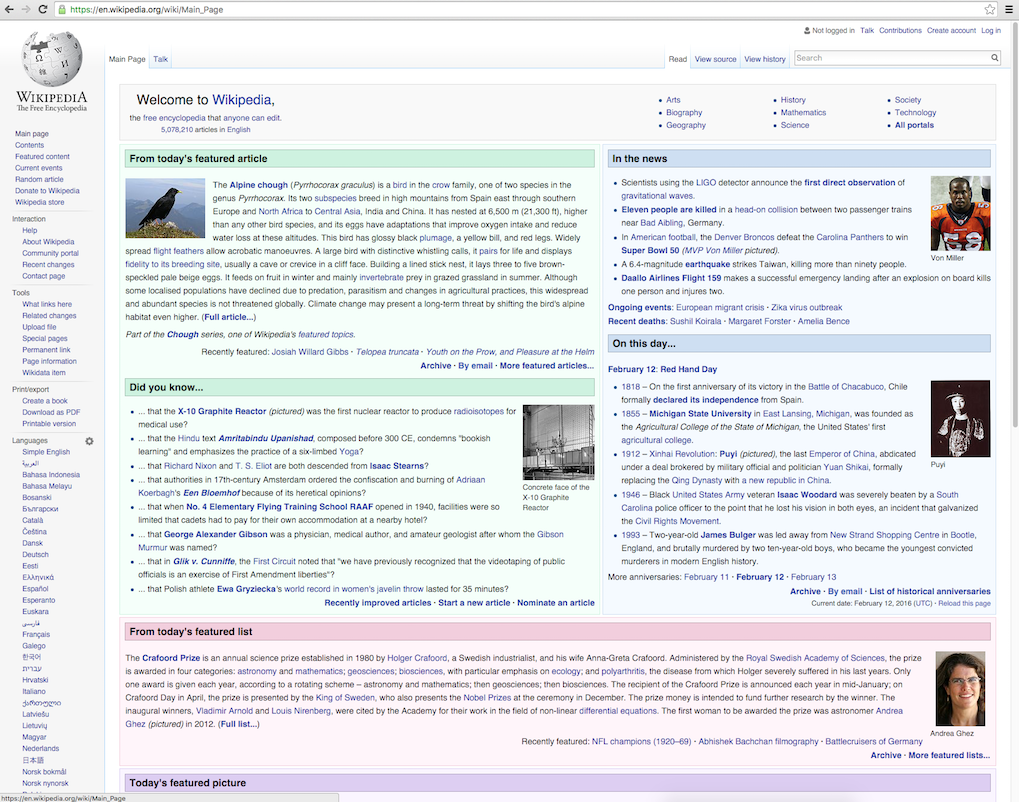
The goal of this exercise is to rebuild how the site looks not how it behaves, so your links don't need to link anywhere. To make a dummy link, use the # as the value of the href attribute on your link. For example: <a href="#">.
Make sure you are committing your changes appropriately and pushing to a remote repository on GitHub. Don’t rush through this. Being able to accurately rebuild a site is a great skill to have and will really help in understanding how CSS works to style your pages.
Further Exploration
- Include a detailed README with author names, project name, a description, setup instructions, and copyright information.
- If you finish quickly, go back to projects you worked on previously this section and add in Bootstrap.
- Begin exploring the Bootstrap documentation. Try implementing elements we haven't explicitly covered here in our curriculum; whether in this site, or site from earlier this section.
Peer/Instructor Code Review
- Does the site utilize divs, spans, classes, floats, etc.?
- Are Bootstrap classes used to style the page?
- Is the code indented properly throughout?
- Are commits made regularly with clear, descriptive messages that complete the phrase "It will..."?
- Are styles applied with ids and classes? Are each used correctly?
Checkpoint
Before moving on, you should be able to:
- Recreate a complex layout using Bootstrap grid and utility classes
- Combine custom CSS with Bootstrap in the correct stylesheet order
- Use Bootstrap docs to find and implement at least one component not covered in class
If you're unsure, re-read the Navigating Documentation lesson or ask AI: "Can you explain how to break a complex homepage layout into Bootstrap rows and columns—without writing my HTML for me?"