📓 1.1.4.11 Bootstrap: Navigating Documentation
As you may have noticed, Bootstrap is a huge framework. The un-minified bootstrap.css stylesheet has thousands of lines of CSS. There's no reasonable way we could address every Bootstrap element and feature in our curriculum in this section. In fact, learning about CSS and design is a very small part of our program. However, we encourage students to explore Bootstrap further on their own — especially if CSS and design is an area of interest. Even if they aren't, we will be using Bootstrap throughout the program and it can be very helpful for building out nice user interfaces for the sites we build.
This lesson will walk through how to best navigate and utilize the Bootstrap documentation.
In this lesson
- Why reading documentation is a core developer skill
- How Bootstrap docs are organized (navbar, sidebar, component entries)
- How to use example code from docs without copying entire pages blindly
AI Support: Overwhelmed by Bootstrap's documentation? You can ask AI to explain how docs are organized, what a section means, or how to find a specific component. Use AI to navigate and understand Bootstrap docs and class names—not to generate full page layouts or complete exercises for you.
Example prompts:
- Weak: "How do I use Bootstrap?"
- Strong: "I'm on the Bootstrap 4.5 Components page for cards. Can you explain what the sidebar sections mean and which part of the example I should read first—without building my page for me?"
- Weak: "Find the right Bootstrap class."
- Strong: "I need a responsive navbar in Bootstrap 4.5. Can you walk me through how to find that in the official docs and what to look for in the example code—without writing my HTML for me?"
- Weak: "Explain this Bootstrap page."
- Strong: "The Bootstrap docs show a navbar example with
navbar-expand-lg. Can you explain what each class in that example does—without generating a full page for me?"Before asking, check: Do I have the license for this? See Using AI Responsibly at Fidgetech and How to Ask for Help.
The Importance of Documentation
Being able to efficiently navigate and reference documentation is one of the most important skills a web developer can have. This doesn't just apply to Bootstrap, CSS, or HTML — it's true of all programming languages. Most developers don't just sit down and type out large amounts of code from memory. It's a constant process of referencing documentation and other resources and experimenting with different code to see what works. Just as we don't need to memorize the phone numbers of everyone we know because our phone will remember them for us, we don't need to memorize everything we learn about coding. Instead, it's just as important to remember how to find a piece of information. When we are calling a friend, we need to know how to use a phone and we need to know their name and how to look up their number, but we don't need to memorize the number itself. Similarly, when we need a feature in our code, as long as we learn efficient ways of finding the information we need — as well as building the skills to integrate that information into our code — we can be great developers.
You will reference documentation constantly at Fidgetech and beyond. For that reason, exploring Bootstrap documentation isn't just a great way to learn more about Bootstrap — it's also good practice for improving your skills at reading documentation in general.
Documentation Structure
You should take a look at the Introduction page and get a sense of what's there (especially by checking the sidebar on the left. For adding Bootstrap features to a site, the Components documentation is very helpful.
When we are looking at documentation, it's always useful to look at the listings in the navbar at the top for general topics. Often, there will be tabs like Documentation, which will take us to the documentation section of the site. While the navbar will have more general topics, we'll often see a sidebar with more specific topics. This is the case not only with Bootstrap but also many other documentation sites. It's helpful to familiarize yourself with the contents of these sidebars. For instance, looking at the sidebar for Bootstrap Components, we can see entries for things like cards, jumbotrons, navbars and carousels. The first two are familiar — while the last two (navbars and carousels) may not seem useful because we don't need them right now. However, you might need them in the future, and it's helpful to acquaint yourself with them now.
Documentation Entries
Every entry in the Bootstrap documentation contains a description of the element, sub-headings for the different ways to customize or implement the element (if applicable), examples of what it looks like, and example code. For instance, if we look at the content for Navbars, we'll see a description of how it works as well as sample code and an example of a navbar built with sample code.
So even if you've never built a navbar before, you can easily start experimenting with integrating the code in your own project. While an example may not make sense at first, actually working with code samples can really help. Also, keep in mind that there is a lot of poorly written documentation out there. Part of being a developer is figuring that out, too. It's often hard, frustrating work — but that's why developers get paid well for doing very skilled labor.
Try asking AI: "I'm looking at the Bootstrap 4.5 Navbar docs. Can you explain how to read the example code section and what I should copy vs. adapt—without building my navbar for me?"
After reading AI's response, explain the concept back in your own words before moving on.
A Note on JavaScript
Many Bootstrap elements have visual effects or animations that require JavaScript. Examples include dropdown menus, modal windows, and so on. We won't begin exploring JavaScript until the next section so we recommend holding off on adding any JavaScript features for now. You will never be expected to add any Bootstrap JavaScript features for an independent project at Fidgetech, so it's up to you if you eventually want to explore them further.
If you do want to explore JavaScript features, the easiest way to do this is to include the CDN link to Bootstrap's JavaScript file in the <head> tags of your HTML document. That means adding the <script> tag seen in the image below, which you can find on the download page for Bootstrap 4.5.
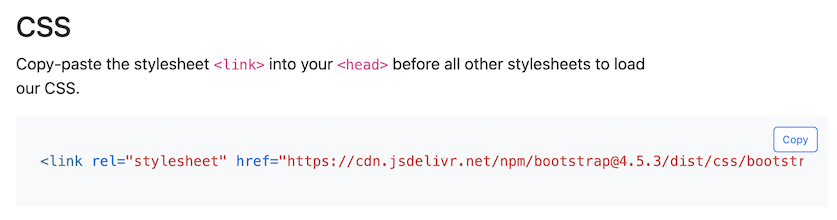
Remember, using a CDN will ensure your project has access to the necessary JavaScript without requiring you to download and insert JavaScript into your own project.
But how can we tell which elements require JavaScript? If we visit Bootstrap's JavaScript Documentation, it contains documentation entries for all elements that require JavaScript. Make sure to select the drop down that says "Show components requiring JavaScript".
Checkpoint
Before moving on, you should be able to:
- Navigate Bootstrap's docs using the navbar and sidebar
- Find a component entry and identify its description, examples, and sample code
- Explain when a Bootstrap component requires JavaScript
If you're unsure, re-read the section above or ask AI: "Can you walk me through how to find the Bootstrap 4.5 card documentation and explain what each section of the page is for—without writing my HTML for me?"