📓 1.1.2.1 Commit Trailers and Github Contributions
There are many reasons why we should commit our code regularly. We can ensure that all the changes in our code are tracked, both major and minor. If something breaks in our code, we can return to a commit where we know the code is working. Finally, regular commits make it much easier for different people working in different places to track and contribute to a project.
However, even with these facts in place, it's often hard for Fidgetech students to get into the swing of making regular commits.
In this lesson
- How GitHub tracks your contributions on your profile
- Why commit frequency and quality both matter
- How to add co-authors with commit trailers when pair programming
- How to verify that commits appear on your GitHub profile
AI Support: Unsure how to write a good commit message or format a commit trailer? You can ask AI to explain commit message conventions in plain language. Do not ask AI to write commit messages for you or complete Git exercises.
Example prompts:
- Weak: "Write my commit message."
- Strong: "My commit message should complete the sentence 'This commit will…' Can you explain what makes a good commit message and give 2 examples of messages that are too vague—without writing one for my current changes?"
Before asking AI, check: Do I have the license for this? See Using AI Responsibly at Fidgetech and How to Ask for Help.
GitHub Contributions
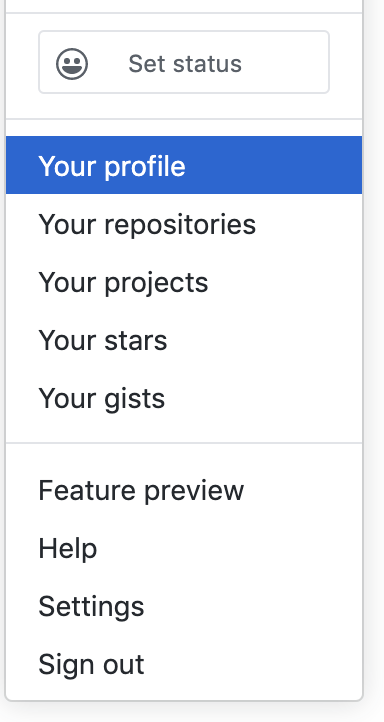
Here's one more motivation — the commits and repositories we make are tracked on our Github profile. These are collectively called GitHub contributions. You can see a calendar view of your GitHub contributions by navigating to Github, signing in and clicking on your avatar in the upper right corner of the screen. Select "Your Profile" from the dropdown.
You'll see a graph that measures all of your GitHub contributions over the course of the year. Unless you were using GitHub regularly before you started Fidgetech, you'll likely only have a few commits so far. This is totally fine and expected. However, over the course of your time at Fidgetech, you will make hundreds — likely even thousands — of commits.
Here are the contributions of two graduates from the same Fidgetech cohort. Their commits begin in January and end in May — the twenty weeks they were full-time Fidgetech students.
If you take a look, the first student made three times as many commits while they were a student at Fidgetech.
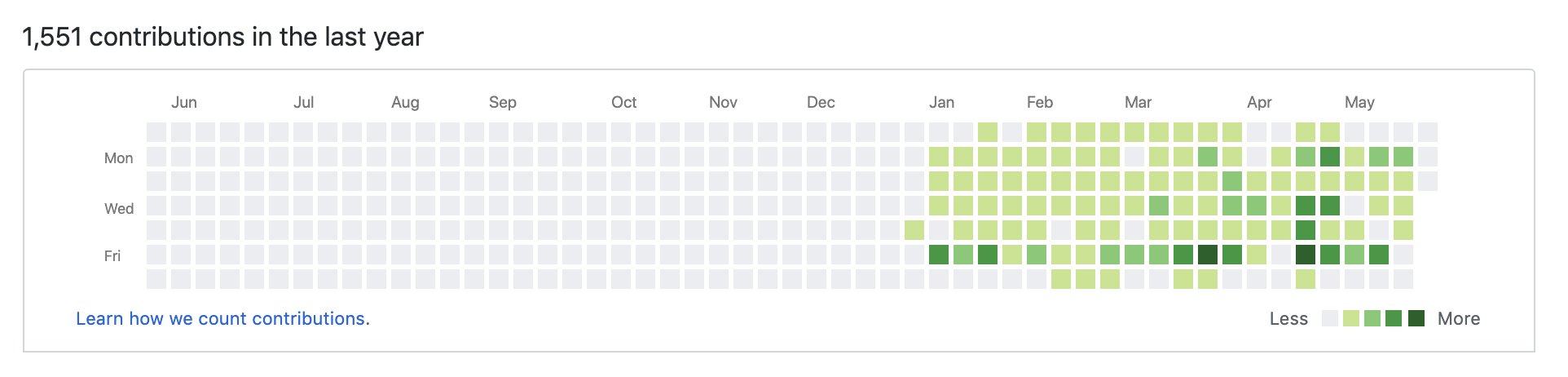
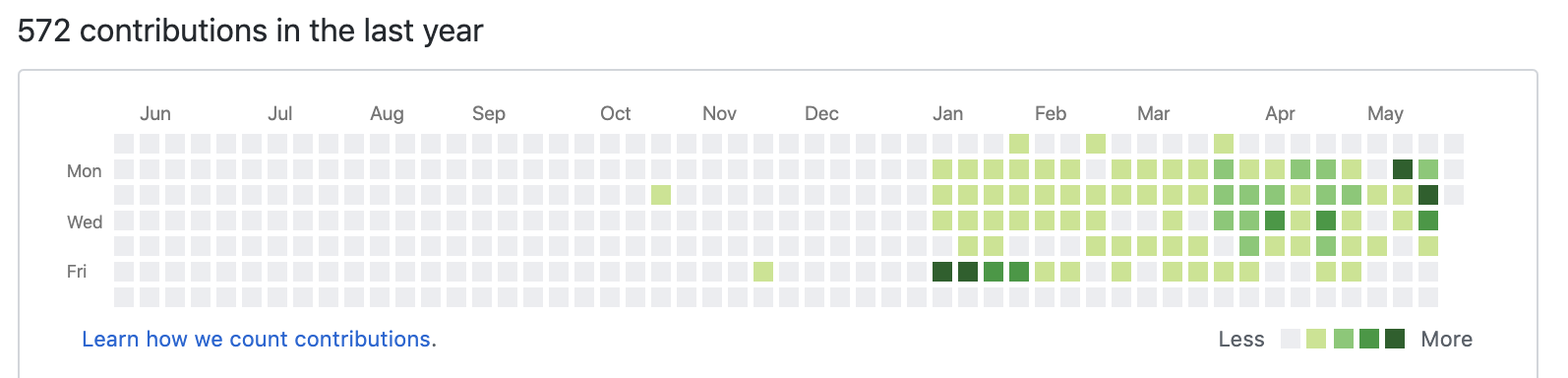
Based on the commit histories above, which of these students do you think did more work? And just as importantly, which of these students was more diligent and thorough?
There's actually no way to know for sure just based on this information, but the first student's commit history suggests that they did more consistent work throughout the program. Even though this may not be the case, first impressions do matter. Your resume and LinkedIn profile will contain links to your Github profile. While there are other, better ways for potential employers to see the work you've done, this is one of many little things that might make a difference.
Over a twenty-week period, assuming each of these full-time students only committed code from Monday through Friday, the first student made about fifteen commits per day while the second averaged five commits per day. While fifteen commits a day is solid, five commits is definitely not enough.
Overall, the quality of commits is more important than the quantity. You shouldn't just commit code in order to rack up more commits. However, you should aim to commit code whenever you add a new feature, fix a bug, or get a test passing (you don't have to worry about tests yet).
Using Commit Trailers
In addition to committing regularly, you'll need to make sure that your commits are actually attributed to you. A standard git commit is set up to only give attribution to one person. Since we usually pair program at Fidgetech, you'll need to do a little extra work to ensure that both pairs get attribution for their work.
We can add co-authors in the command line by adding commit trailers when we write a commit message.
Try asking AI: "What is a
Co-authored-by:commit trailer and when should I use it when pair programming? Can you explain the format—without writing a commit message for me?"After reading AI's response, explain the concept back in your own words before moving on.
Let's compare two commits. The first is a commit that we'd make if we were working solo:
$ git commit -m "Add README"
Now, however, let's say that we have the good fortune of pair programming with Ada Lovelace and Grace Hopper, two notable figures in coding history. We want to make sure they get attributed for the work, too. We can add trailers like this:
$ git commit -m "Add README
>
>
Co-authored-by: Grace Hopper <github-email@super-programmer.com>
Co-authored-by: Ada Lovelace <another-gh-email@super-programmer.com>"
We start by writing our commit message as usual. However, instead of closing out our commit message with quote marks, we instead hit Enter twice, creating two lines of whitespace. (The > denotes that we've started a new line in the terminal and that we haven't completed our previous command.)
For each co-author, we start by adding Co-authored-by: followed by a space. Next, we add the preferred name of the co-author as well as the email associated with their Github account. It's very important that the right email is added — otherwise, the co-author won't be correctly attributed in the commit.
Once we are done, we complete the commit with the usual quote marks. Grace Hopper and Ada Lovelace are now contributors on this commit. If we were working on a computer that has a different user in the global git configuration (see Git Project Setup if you need a refresher), that user would also be a contributor.
Let's do one more example — this one will follow the example of having one user hosting a VS Code Live Share session with their pair. The host should already have a global git user and email set up on their machine. For that reason, the commit trailer only needs to include the pair that's being hosted (not the host).
So if you were hosting a VS Code Live Share session with Ada Lovelace and you've already set up a global user on your machine, your commit would look like this:
$ git commit -m "Add README
>
>
Co-authored-by: Ada Lovelace <another-gh-email@super-programmer.com>"
Once you push your code, you should verify that it's correctly showing both contributors in Github. Now you'll properly be attributed for your work — including on the commit graph in your Github profile.
For more information on creating a commit trailer, see Creating a commit with multiple authors.
If your commits aren't showing up in the commit graph on your profile and you'd like to troubleshoot, see Why are my contributions not showing up on my profile?.
If you want to read more about viewing your GitHub contributions, see Viewing contributions on your profile.
Checkpoint
Before moving on, you should be able to:
- Explain what GitHub contributions are and where to view them on your profile
- Describe when to commit and what makes a good commit message
- Add a
Co-authored-by:trailer when pair programming - Verify that commits show up on your GitHub contribution graph
If you're unsure, re-read the section above or ask AI: "My commit message should complete the sentence 'This commit will…' Can you explain what makes a good commit message and give 2 examples of messages that are too vague—without writing one for my current changes?"