📓 3.4.2.1 Firestore Queries
As our data gets more complex, we'll want to use queries to filter our data. If you've worked with a SQL database before, you may have written queries that include where clauses to narrow down which records come back.
A where clause can be used to filter data, and fortunately, Firestore uses this terminology, too.
Firebase offers solid documentation on Firestore queries.
When we discussed data structures earlier in this section, we considered a hypothetical use case of an application for finding and reviewing trails. Let's see how we might structure some queries for finding different trails based on their name and trailLength.
Simple Firestore Queries
Firestore has a variety of functions that we can use to build queries that filter and sort our database data. Let's look at a simple Firestore query to get us started. This query will get documents in our database that have a name that matches "Enchantment Trail".
import { query, collection, where, getDocs } from 'firebase/firestore';
import { db } from '../firebase';

const q = query(
  collection(db, "trails"),
  where("name", "==", "Enchantment Trail")
);
The query() function helps us create a query. The first argument is always the collection reference that we want to filter and sort, and the second argument represents how we want to sort or filter the specified collection. We've added a where() function call as the second argument in query(). The where() function takes three arguments:
- 1st Arg: the document field that we want to filter by.
- 2nd Arg: a comparison operator, like
==. - 3rd Arg: the value that should be matched.
If we then wanted to use this query in a call to the database, we would pass it as the argument to a getDocs() function call:
const q = query(collection(db, "trails"), where("name", "==", "Enchantment Trail"));

const querySnapshot = await getDocs(q);
querySnapshot.forEach((doc) => {
  console.log(doc.id, " => ", doc.data());
});
Or, we could set up a listener, like so:
const q = query(collection(db, "trails"), where("name", "==", "Enchantment Trail"));

const unsubscribe = onSnapshot(q, (querySnapshot) => {
  console.log("Current data: ", querySnapshot.docs.map((doc) => doc.data()));
});
Notice that a query slots into onSnapshot() exactly where a collection reference did in our Help Queue listener. That's why adding a filter to a listener later on won't require us to restructure any of the code around it.
It would be reasonable to guess that the snapshot we get back has a data() method on it, and to write querySnapshot.data() above. It doesn't. data() belongs to a single document snapshot, not to the QuerySnapshot that represents a whole set of results. To get the data out of a query snapshot, we go through its docs property first, which is why the code above reads querySnapshot.docs.map((doc) => doc.data()).
In plain JavaScript, that mistake would have thrown a runtime error the first time the listener fired. Because Firebase ships type definitions, TypeScript flags it as you type: Property 'data' does not exist on type 'QuerySnapshot'. Your editor will also list what does exist on the type, which is often the fastest way to find the method you actually wanted.
Comparison Operators
There are a lot of comparison operators. Here's the full list:
<less than<=less than or equal to==equal to>greater than>=greater than or equal to!=not equal toarray-containsarray-contains-anyinnot-in
We won't get into depth about how to use each of these. If you are interested in learning more or finding a solution to a specific querying use case in your code, visit the docs on query operators.
These operators are one more spot where types quietly help. Firestore's type definitions restrict the second argument of where() to this exact list of strings, so a typo like "==" written as "===" is caught immediately rather than failing at runtime.
Ordering and Limiting Query Data
We can order how data is returned from the database with the orderBy() and limit() functions. To learn how to use these functions, and their limitations, visit the following docs:
We can also paginate the Firestore data with the startAt() and endAt() functions. To learn how to use these functions, and their limitations, visit the following docs:
Compound Queries
What if we wanted to find trails in a specific region that are longer than ten miles? Can't we just include two where() functions in our query() function, like this?
const q = query(
  collection(db, "trails"),
  where("region", "==", "Enchantments"),
  where("trailLength", ">", 10)
);
Yes, we can! This is known as a compound query. We can do compound queries in Firestore, but only after we do some initial configuration.
Firestore requires an index for every query. A database index is similar to an index in a book. If we want to find all the passages about "loops" in a book on JavaScript, we could do so much faster if we can look in an index and find the specific page numbers where loops are mentioned. Otherwise, we'd have to go through every single page of the book to find all the passages on loops.
A database index works the same way. It's a structure that allows our queries to be conducted much more efficiently. This is why Firestore requires indexes for all queries: so it can be extremely fast.
Firestore automatically indexes all fields, which is why we can do simple queries without creating a custom index. However, for certain compound queries, we have to create the indexes ourselves. This is explained in the docs for compound queries:
You can chain multiple equality operators (
==orarray-contains) methods to create more specific queries (logicalAND). However, you must create a composite index to combine equality operators with the inequality operators,<,<=,>, and!=.
Here's an example of a query that combines an equality operator with an inequality operator:
const q = query(
  collection(db, "trails"),
  where("trailLength", ">", 10),
  where("trailLength", "!=", 15)
);
There is good news, however. If we try to make a query in our code for a combination of fields that aren't properly indexed, our application will throw an error, along with a link to create the missing index. Don't panic if this happens; just follow the link and let Firestore take care of the work for you.
This is a good moment to notice the limits of what types can check. TypeScript verifies the shape of our query: that the operator is one Firestore recognizes, that we passed a collection reference first, that the whole thing is a valid Query. It cannot know whether the index that this particular combination of fields requires exists in your Firebase project. That's information that lives on Firebase's servers, not in our code. Missing indexes will always be a runtime discovery.
You can also create indexes manually by clicking on the Indexes tab within the Firestore Database section of the Firebase console. However, the documentation actually recommends just trying to make queries via an application and following the link if needed. For information on manually creating indexes, see Managing indexes in Cloud Firestore.
There's one more rule for compound queries: if you use inequality/range operators (<, <=, >, >=, !=), they must all filter on the same field. For example, the following query is valid, because both inequality operators target the same field (trailLength):
const q = query(
  collection(db, "trails"),
  where("trailLength", ">", 10),
  where("trailLength", "<=", 15)
);
However, the following query is invalid because it uses inequality operators on two different fields:
const q = query(
  collection(db, "trails"),
  where("trailLength", ">", 10),
  where("elevation", ">", 500)
);
Note that TypeScript will happily compile both of these. The rule about matching fields is a Firestore rule, not a type rule, so it shows up as a runtime error when the query runs.
If you run into any issues creating compound queries, visit the Firestore docs on compound queries to get more information about the rules and requirements.
Running Firestore Queries in Firebase Console
We can also explore simple queries in the Firebase console, however it's important to note that the queries that are generated are shown in the Web/JavaScript version 8 (the namespaced version), instead of version 9 (the modular version) that we are using. So, you'll need to translate these queries into version 9 syntax by referencing the Firebase docs.
Let's take a look!
Start by clicking on the Firestore Database tab of a Firebase project. As stated previously, the project that we'll use in these examples is the fictional app that lists and rates trails in the Pacific Northwest.
Our data is sorted into three columns. The left column has the trails collection, the middle column has our trail documents, and the right column has the fields of a selected document.
There's a small icon at the top of the middle column (circled in red in the image below) that allows us to filter data in a collection:
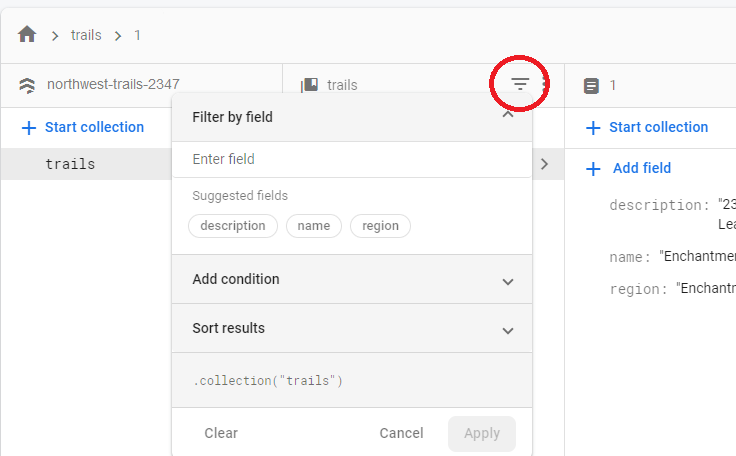
If we click on this icon, we can create our own filters. We just need to specify the field and condition we want to filter by.
In the following example, we are looking for all trails in the Enchantments region:
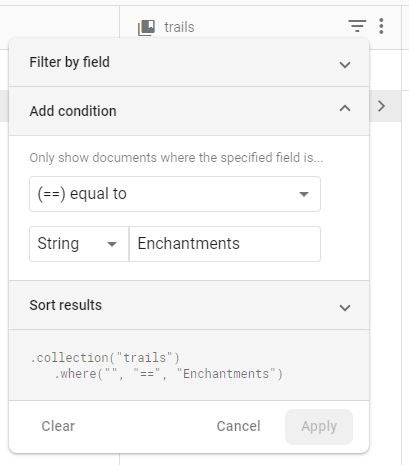
One thing that's nice is that the console helpfully shows us what the query actually looks like, so we can use this to test simple queries and actually copy and paste the query code into our application.
Here's how the query looks:
.collection("trails")
  .where("region", "==", "Enchantments");
This is pretty straightforward. The where() clause takes three arguments: a field name, an operator such as == or >, and the value that the field should have.
The only issue is that we'll need to translate this into the modular syntax we've been using, with the query() and where() functions. This is what our translation would look like:
const q = query(collection(db, "trails"), where("region", "==", "Enchantments"));